Key Takeaways:
- Reduce engineering administrative work by eliminating manual BOM exports and/or the SOLIDWORKS-to-Excel workflow. When you replace that with a native CAD-to-ERP integration, it keeps engineering and business teams connected.
- Turn CAD BOMs into Dynamic Project BOMs to experience the benefits of syncing assemblies, subassemblies, parts, and revisions directly from SOLIDWORKS into a live ERP BOM that evolves with the design. Thats one of the perks, when you no longer need to export SOLIDWORKS BOM to Excel; improved efficiency.
- Working with an ERP that integrates with SOLIDWORKS will save you time and money by allowing your team to procure items, including long-lead components, early. This can be done problem free when BOMs are released in stages, keeping projects flexible and on time.

Is there an ERP that integrates with SOLIDWORKS?
Yes!
Often referred to as “the SOLIDWORKS ERP”, Total ETO provides native SOLIDWORKS integration and helps custom machine builders connect engineering, purchasing, manufacturing, and accounting in a single ERP platform.
How Total ETO Connects SOLIDWORKS to Enterprise Resource Planning
When engineers create or update assemblies in SOLIDWORKS, Total ETO helps move BOM information into the ERP workflow so purchasing, inventory, production, and costing teams can work from current project data.

Built for Custom Machine Builders Using SOLIDWORKS
If your team exports SOLIDWORKS BOMs to Excel, Total ETO helps replace that manual handoff with a connected CAD-to-ERP workflow. Total ETO is a strong fit for:
- System integrators building automation systems, robotic cells, and custom equipment
- Panel shops managing electrical BOMs, purchased parts, and labor
- OEMs building configurable or semi-custom machinery
Our SOLIDWORKS ERP integration Creates Less Work for Engineers
Engineers, in particular, LOVE how well this ERP integrates with SOLIDWORKS and other popular CAD systems. Total ETO makes your bill of materials dynamic, so they’re always current and accurate. Dynamic BOMs mean less paperwork and double-entry for engineering. Additionally, your team can start designing a system, releasing parts to procurement in stages, including long-lead items. If your subsequent design changes your earlier work, that’s not a problem; we help manage that too.
Reducing downtime and clerical work like this is one of the best ways an ETO manufacturer can increase profits. Here, Mechanical Designer at Bold Robotic Solutions, Geoff Hofsink shares a few of their first immediate gains in engineering.
How Does Native 2-way SOLIDWORKS Integration Work?
1. Design in CAD as Usual
When starting out, many Custom Machine Builders export their SOLIDWORKS BOM to Excel. At first, that works well for smaller projects. However, as projects grow, that manual process creates unnecessary work. Therefore, our goal is to eliminate spreadsheets and the extra work that comes with them.
Instead, Total ETO’s native 2-way CAD integration creates a live engineering-to-ERP workflow. Because our ERP controls are embedded directly inside SOLIDWORKS, designers can synchronize BOM information without leaving CAD. As a result, engineering and the rest of the business stay connected. Ultimately, you’ll see how an ERP that integrates with SOLIDWORKS improves efficiency, accuracy, and profitability.
Instead of relying on one-time BOM exports, Total ETO’s native 2-way CAD integration creates a live engineering-to-ERP workflow. Because our ERP controls are embedded directly inside SOLIDWORKS, designers can synchronize BOM information with Total ETO without ever leaving their CAD environment. As a result, engineering, purchasing, production, and costing all work from the same up-to-date project data. Ultimately, you’ll see how an ERP that integrates with SOLIDWORKS can improve your team’s efficiency, accuracy, and profitability.
Your team builds the assembly, subassembly and parts structure in SOLIDWORKS. You don’t need to manually recreate the BOM in the ERP, or leave CAD to start the ERP handoff.
2. Total ETO Controls are Available Inside CAD
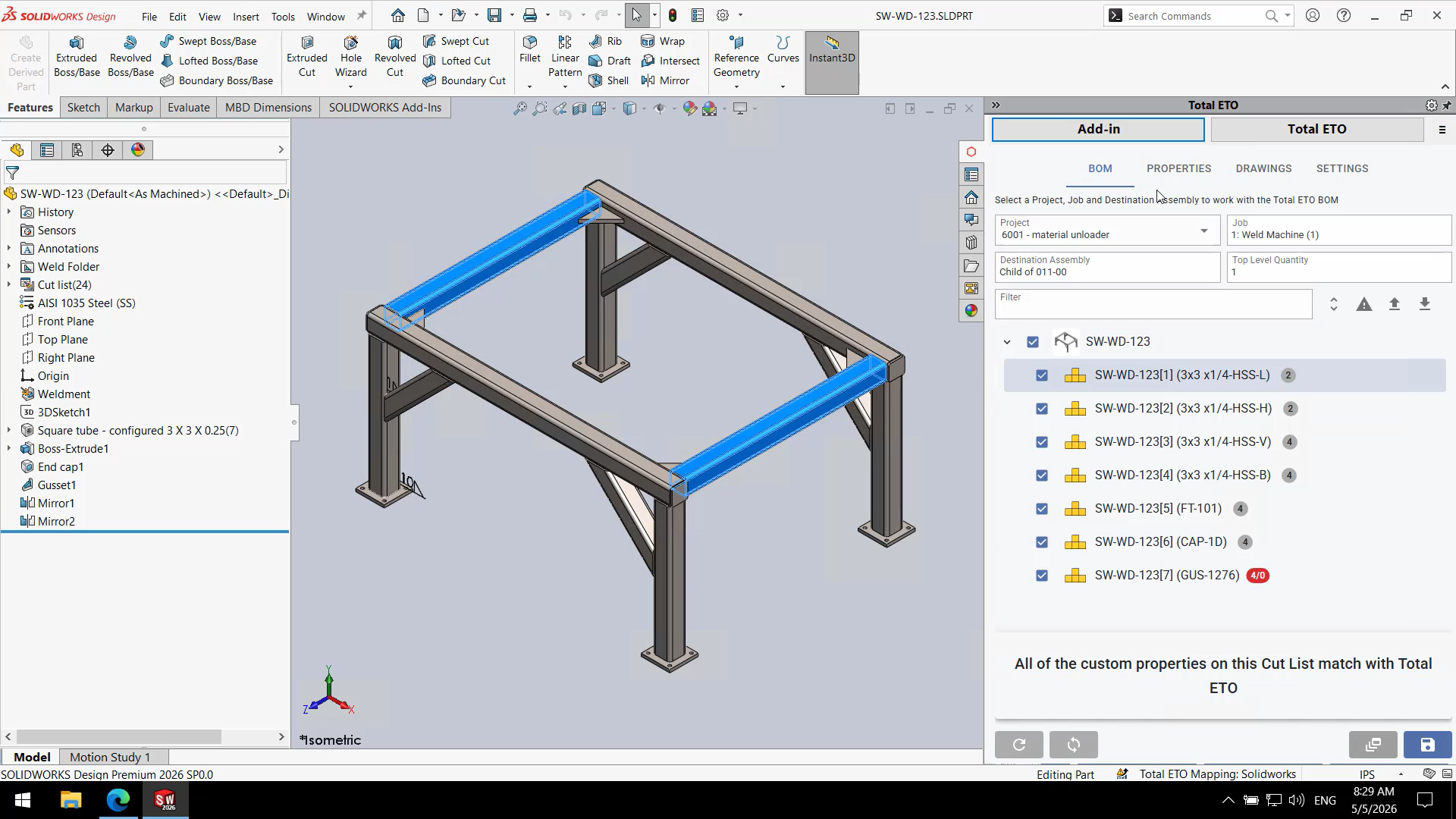
It’s a native SOLIDWORKS integration, as a result, Total ETO controls are embedded inside the CAD system. That means the designer can interact with Total ETO from within the CAD environment and sync BOM information directly into the Total ETO BOM.
This integration is far more powerful than a simple export and import process. It eliminates duplicate data entry and allows engineers to continue working inside their preferred CAD tools. The system provides live visual feedback by comparing the CAD assembly structure directly to the project BOM, making it easy to see exactly which parts of the BOM need to be re-synchronized as designs evolve.
Click screenshot to expand.
3. CAD BOM Data is Synchronized into the Total ETO BOM
The integration brings BOM data from CAD into the project/job structure in Total ETO BOM. Notably, this typically includes information such as:
- Assemblies
- Subassemblies
- Parts
- Quantities
- Descriptions
- Part numbers
- Purchased/manufactured items
- Other mapped CAD properties, depending on setup
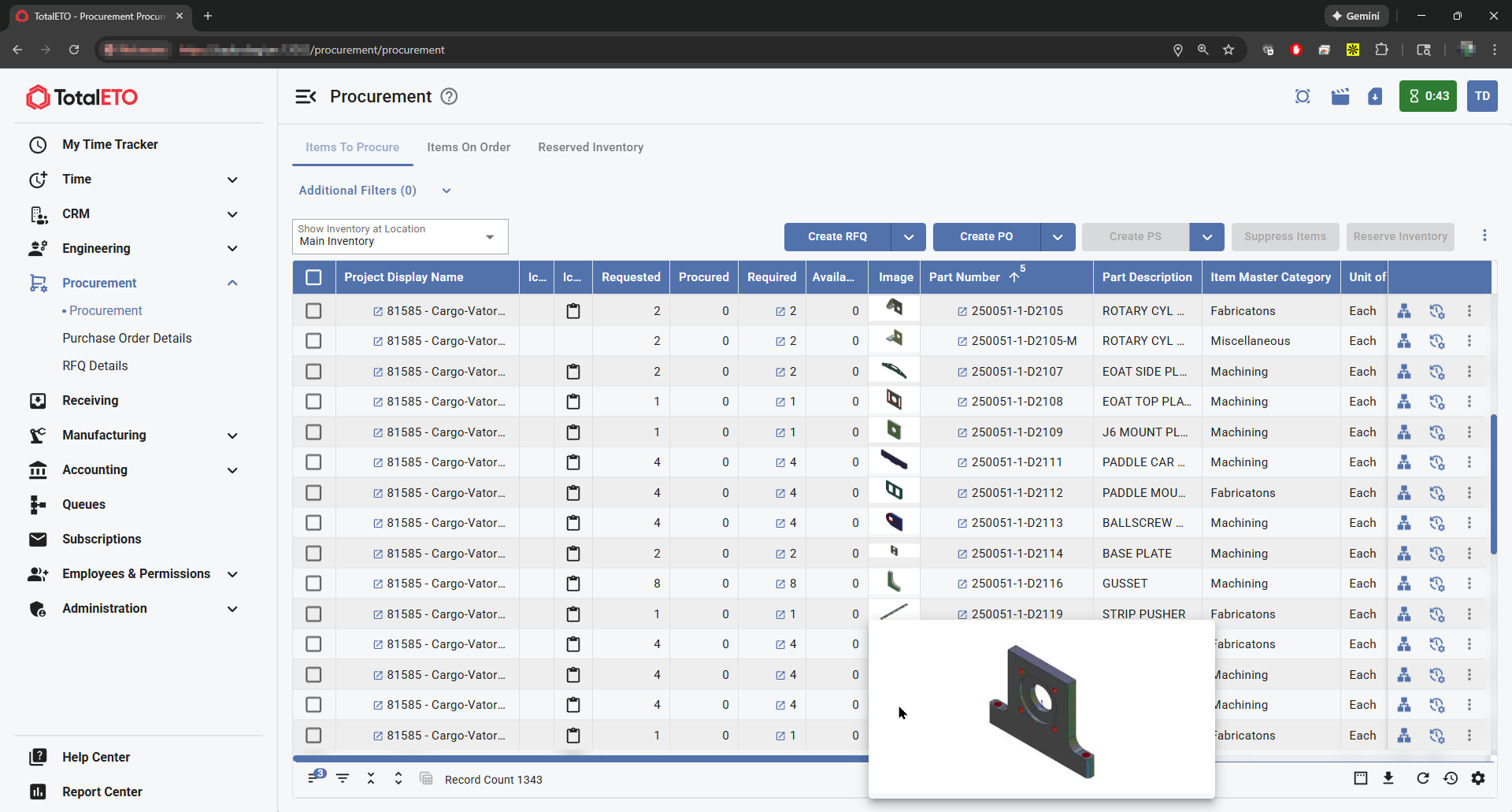
CAD thumbnail images are also included in the information stored in the database. In doing so, Engineers and Designers continue working in a visual world, and the same images from SOLIDWORKS and Inventor are included as part of the synchronization. This means they are available in critical areas throughout Total ETO, allowing employees to quickly see the 3D CAD images associated with part numbers and descriptions.
Ultimately, the key value is that the CAD BOM becomes part of the ERP workflow instead of living separately in engineering spreadsheets.
4. The BOM Becomes a Structured, Dynamic BOM in Total ETO
Once inside Total ETO, the BOM becomes more than a flat, static list…. enabling new Dynamic BOMs to maintain the same hierarchical assembly structure from SOLIDWORKS.
It’s important for the engineering team to compare and manage the Total ETO BOM and keep it synchronized with the CAD software BOM structure. Engineers can manage the BOM as a hierarchical structure, viewing assemblies and subassemblies in a flexible engineering interface.
This is why many ETO manufacturers know that Total ETO is the best ERP for SOLIDWORKS; The BOM can continue to change as engineering progresses. Meanwhile, engineers can release assemblies or individual items as needed, including long-lead components, without waiting for the entire design to be complete.
5. Engineers Can Release Parts to Procurement in Stages
- long-lead items
- individual parts
- subassemblies
- partial BOM sections
- revised items
Click screenshot to expand.
For Integrators, Panel Shops, and OEMs, this is a major advantage because waiting for a “final BOM” often creates purchasing delays.
6. Procurement Works from the Released Engineering Demand
Once items are released, purchasing can act on them inside Total ETO. Procurement can:
- See demand from engineering BOMs
- Control Release of complex scenarios to procurement, such as purchase a Complete Assembly, Assembly and its Contents, or the Assembly Contents only.
- Group common parts
- Combine supplier purchases
- Issue RFQs and POs
- Revise POs as changes occur
- Reserve inventory by project
- Track what has already been ordered
Put simply, the CAD integration does not just send a BOM… It feeds the purchasing workflow.
7. The “2-Way” Part: Changes Flow Back into Engineering Visibility
The “2-way” value is that the BOM is not just thrown over the wall from CAD to ERP. Engineering can continue managing the BOM while Total ETO tracks what has happened downstream.
For example, if an engineer changes a part or assembly after release, Total ETO helps identify the impact on the BOM and procurement. In addition, the system communicates material changes to procurement and helps manage over-procured or under-procured items. Meanwhile, engineering can see and manage the BOM, while, at the same time, purchasing has visibility into released items, procurement status, and changes that need attention.
That’s the important distinction:
One-way CAD import has the BOM exporting from SOLIDWORKS once.
Two-way CAD integration means engineering syncs BOM data from SOLIDWORKS into Total ETO, which manages the dynamic structured BOM, and releases items in stages. Total ETO keeps engineering and procurement aligned as parts change, get released, ordered, revised, or over/under procured.
See the SOLIDWORKS ERP Workflow in Action
If you’re looking for the best ERP for SOLIDWORKS, Total ETO was built specifically for Engineer To Order manufacturers and Custom Machine Builders. Our native SOLIDWORKS ERP solution eliminates manual BOM transfers. It also streamlines purchasing and ensures engineering, production, and accounting are working from the same up-to-date data.
When you need an ERP that integrates with SOLIDWORKS, Total ETO helps your team reduce errors, accelerate procurement, and deliver projects more efficiently.
What’s next?
In a demo tailored to your organization, we’ll show you what happens when you connect your SOLIDWORKS BOM to an ERP. Total ETO helps your team:
- Move BOM data from SOLIDWORKS into ERP
- Release parts to purchasing
- Manage engineering changes
- Track project costs earlier
- Reduce duplicate entries between engineering and operations
What do Other SOLIDWORKS Users Think

“We’re finding that from design completion to manufacture start is a lot faster than it ever used to be. As an example, we had some fabrication tasks that we anticipated would take 300 man-hours, which only took us 65 man-hours.” David Hoskins, Operations Engineer
“Total ETO can integrate with SOLIDWORKS and that was very important to our business.”
Timm Schaetz, President
“Total ETO has improved our job costing metrics, providing enhanced operational decision making and production efficiency”. Ben Baker, Program Manager
FAQ
Can we release parts to purchasing before the full design is complete?
Yes. Total ETO supports staged release workflows, allowing teams to release long-lead items while engineering continues. That’s one of the perks when you no longer have to export your SOLIDWORKS BOM to Excel; Total ETO saves your company a lot of money this way.
What happens when the SOLIDWORKS design changes?
This is where you really get to see why our software is the best ERP for SOLIDWORKS. Total ETO helps manage changing BOMs so engineering, purchasing, and production teams can stay aligned as project requirements evolve. That’s a lot less work for everyone in the organization, but especially engineering.
Can SOLIDWORKS BOMs be imported into Total ETO?
Yes. SOLIDWORKS BOMs can be brought into Total ETO so engineering data can be used throughout the ERP workflow. This helps reduce manual BOM entry and gives purchasing, inventory, and production teams better visibility into the parts required for each project.
Can Total ETO help reduce manual BOM entry from SOLIDWORKS?
Yes. Total ETO is an ERP that integrates with SOLIDWORKS, helping reduce manual BOM entry by enabling engineering teams to transfer BOM information from SOLIDWORKS to the ERP system. This minimizes duplicate data entry, reduces the risk of transcription errors, and helps teams work from a more accurate project BOM.
What happens when a SOLIDWORKS BOM changes after parts have been released?
In Engineer To Order manufacturing, BOMs often change after purchasing has already started. As the best ERP for SOLIDWORKS, Total ETO helps teams manage these design changes by keeping engineering and procurement aligned as parts are added, changed, released, ordered, or revised.
What is the difference between a static BOM and a dynamic BOM?
A static BOM is usually a fixed list of parts that changes infrequently. A dynamic BOM changes as engineering work progresses. Custom Machine Builders often need dynamic BOMs because parts, assemblies, quantities, and purchasing requirements may change throughout the project. Our SOLIDWORKS ERP integration handles the changes, saving your team time and money.
What is the difference between SOLIDWORKS PDM and ERP?
SOLIDWORKS PDM helps manage CAD files, revisions, and engineering document control. ERP manages business workflows such as purchasing, inventory, production, costing, and accounting. Total ETO connects engineering BOM information to ERP workflows so teams outside engineering can act on project data.
Does Total ETO work with SOLIDWORKS assemblies and subassemblies?
Yes. Total ETO is designed to support structured BOMs that include assemblies, subassemblies, and parts. This is important for custom equipment manufacturers because complex machinery often requires nested BOMs rather than a simple flat parts list.