Key Takeaways
- With an ERP that integrates with Autodesk, you can eliminate costly BOM errors and double entry by replacing the manual Inventor export to spreadsheets with a live connection that keeps engineering, purchasing, and production working from the same data.
- An Inventor ERP can reduce project delays by releasing long-lead items, assemblies, and approved sections to procurement before the entire design is complete.
- To avoid revision confusion across departments, automatically track design changes, and maintain alignment between engineering, procurement, and manufacturing. This prevents rework and negative surprises. An ERP with native Autodesk integration is usually best here.
A Few Custom Machine Builders Who Integrated Autodesk Inventor with Total ETO

Are you looking for an ERP that integrates with Inventor?
A lot of Integrators and OEMs are. We’re glad you found us… You will be too!
Check out this brief interview with Jack Sealey, Business Operations Lead at Dela Control. Jack shares some of the first benefits they experienced when they started using this ERP that integrates with Autodesk Inventor.
The Premier Autodesk Inventor ERP for Custom Machine Builders
Total ETO provides a seamless, bi-directional link between Autodesk Inventor and your entire enterprise. Imagine how much more efficiently your team will work when your design data is connected to procurement, job costing, and accounting. Since we built our solution specifically for the design-build nature of Engineer To Order manufacturing, your team can manage high-variability projects more efficiently.
Total ETO, an Autodesk ERP, is also the first of its kind! We built the only fully web-based ERP for Engineer To Order manufacturers. That means you can use Total ETO on any device with a web browser — no remote desktops, no VPNs, and no compromises. Powered by the reliability of our legacy system and re-engineered for the web, it’s an ETO ERP built on the most innovative, modern tech, designed just for your workflow.
A 5-Stage Integration Workflow
It’s common for ETO manufacturers to start out by exporting their Inventor BOM to Excel. That creates a lot of double entry, though, along with errors and rework. Rather than relying on static exports, Total ETO creates a live data stream:
1. Design as Usual: Engineers develop assemblies and parts within Autodesk Inventor.
2. Instant Sync: BOM data is pushed directly into the ERP environment without manual exports.
3. Dynamic Organization: Parts are structured into a nested, flexible project BOM, so making changes later on stress-free.
4. A Head Start for Purchasing: Procurement can act on released sub-sections or long-lead items immediately, keeping timelines and costs in check.
5 Alignment Control: The system automatically tracks design revisions so production and procurement never fall out of sync.

Why is Total ETO the “Inventor ERP”? Our Embedded Controls Stay Within Inventor
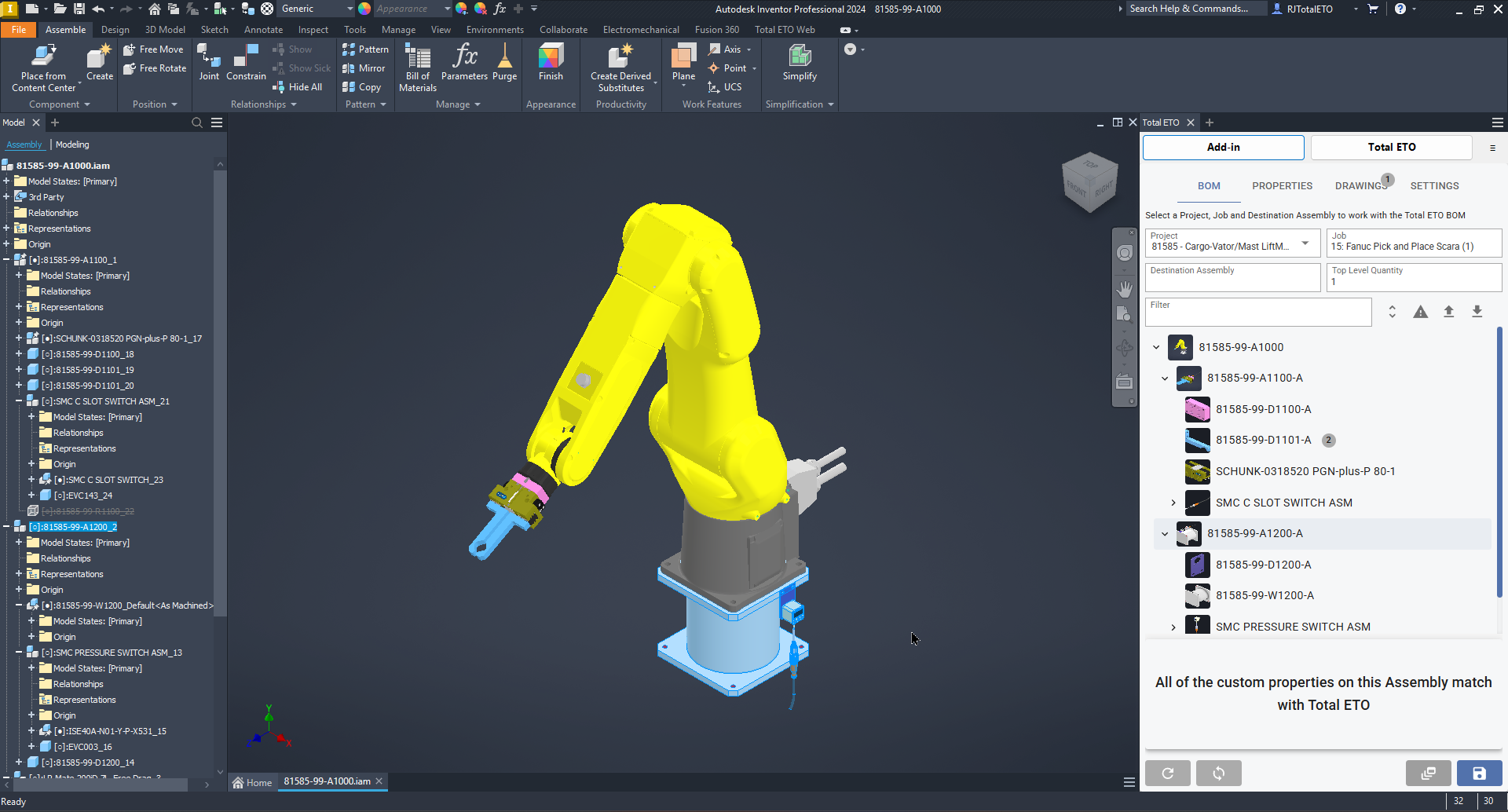
Most custom manufacturing teams prefer an ERP that integrates with Autodesk. Engineers love Total ETO especially, because it doesn’t force them to switch between applications. Our native controls are embedded directly inside the Inventor interface, allowing designers to manage the ERP handoff without ever closing their CAD files. No more exporting your Inventor Autodesk BOM to Excel.
This deep integration offers far more than a simple data dump. It provides real-time visual validation, showing a side-by-side comparison of the Inventor assembly structure and the project BOM. As your machine design evolves, our ERP instantly flags discrepancies and identifies exactly which items your team needs to re-synchronize. Click screenshot to expand.
Visual Data for the Whole Shop
When you synchronize your Inventor files, the system doesn’t just pull text; it captures 3D CAD thumbnails and mapped properties directly from your models. The system stores this visual context in the database and gives every department access to it. Now, employees in procurement or on the shop floor can view exact 3D images for part numbers, reducing errors and improving clarity.
The Power of Phased Releases
For Integrators and OEMs, waiting for a “finalized” design is a recipe for project delays. Total ETO enables staged BOM releases, allowing engineering to drip-feed long-lead components, individual subassemblies, or revised sections to the purchasing team while the rest of the machine is still being designed. This keeps your supply chain moving and ensures that critical parts are on-site exactly when they are needed.
Closing the Loop with 2-Way Visibility
For Integrators and OEMs, waiting for a “finalized” design is a recipe for project delays. Being an ERP that integrates with Autodesk Inventor, Total ETO enables staged BOM releases, allowing engineering to drip-feed long-lead components, individual subassemblies, or revised sections to the purchasing team while engineers design the rest of your machine.
Our ERP keeps your supply chain moving and ensures critical parts arrive exactly when you need them.
Since the Autodesk integration is bi-directional, engineering can monitor the procurement status of their parts while continuing their design work. If you modify a component in Inventor after releasing it, our ERP identifies the downstream impact and helps procurement manage revisions.
By linking Autodesk Inventor to an ERP designed for your ETO workflow, you provide your entire organization, from sales to engineering, to accounting, a single, accurate source of project truth.
See Inventor and Total ETO Working Together
When you find an ERP that integrates with Inventor so well, it’s hard to ignore. So, see it for yourself! In a personalized demo, we’ll show how Autodesk Inventor data flows directly into Total ETO, helping your team:
• Synchronize BOM information from Inventor into ERP
• Release materials and assemblies to procurement as needed
• Manage design revisions throughout the project lifecycle
• Gain earlier visibility into project costs and commitments
• Eliminate redundant data entry between engineering and operations
Connecting your Inventor BOM to an ERP not only simplifies engineering, improving accuracy and efficiency, it has the same effect throughout the whole organization.
What do Other Inventor Users Think?

“The easiest and most thought out ERP integration we have ever been a part of. And a great fit for our team. It's intuitive, seamless, and helps us stay alighed across every stage of a project.” Steven Coleman, Founding Partner
“Within weeks of implementation, we were seeing a 31% improvement in our value added work”stay alighed across every stage of a project.” Suren Moodley, fmr Chief Operating Officer
"Total ETO tightly connects engineering, procurement, and accounting. The support has been top notch along with active meaningful improvements". Kevin Marrick, President
FAQ
Can I release parts before finishing the design?
Yes. Total ETO is known for its staged release workflows, which let teams release long-lead items while engineering completes the design.
Can Total ETO import my BOM from Inventor?
It takes just a few seconds to bring your BOM in from Autodesk Inventor. Engineering feeds data directly into our ERP, giving procurement, inventory, and production teams instant access to real-time information.
What happens in the ERP when a design changes in Autodesk after parts are released?
BOMs change often in our industry, even after purchasing has started. Total ETOs 2-way native CAD integration means the changes made in Inventor, are also updated in procurement, manufacturing, and sales. It’s an impressive CAD link, but being an Autodesk ERP doesn’t mean we only benefit engineering. Your entire organization see’s increased accuracy, and efficiency.
How do static BOMs and Dynamic BOMs differ?
You’re probably used to working with static BOMs, they make design changes difficult. Dynamic BOMs are flexible, changing with the design. That means your parts, assemblies, quantities, and purchasing requirements are just as flexible; from quote to ship with every project.
What information does Autodesk Inventor send to Total ETO?
With Total ETOs 2-way native CAD integration, it doesn’t feel like data is being passed from one software to another. Instead, you’re working in the same system. All your BOM data, part numbers & descriptions, quantities, dimensions, engineering change orders and more is readily available.
Total ETO is the premier Autodesk ERP, but does it integrate with other CADs?
Yes! Total ETO integrates with SOLIDWORKS, OnShape, and other similar platforms. We also integrate with accounting software too, including Quickbooks, Sage, and Xero.